The copiable prompt for these instructions is on the AI Instructions page.
These instructions describe how to create a Steam event for GnollHack, such as a Major Update or a news announcement. The result is the event text, ready to paste into the Steam event editor, and two event images: the 800×450 cover image and the 1920×622 header image.
Inputs to Collect
Collect the following before writing anything:
- Topic. What the event announces, for example a new platform, a major update, or a tournament.
- Source text. Any text the event is based on, such as a Reddit post, a Discord announcement, or GitHub release notes. If the user gives a link that you cannot open, ask the user to paste the text.
- Source picture. Ask the user for the picture to use for the event images, as an attached image or a local file. Do not create the images without one.
The source picture should:
- be landscape and at least 1920 pixels wide;
- have free space on its left side for the text, because the layout below puts the text on the left (if the free space is on the right, ask the user whether the picture may be mirrored);
- have its subject placed so that the subject's face can stay between rows 150 and 472 of the header.
Look at the picture before designing anything. Note where the subject is, where the free space is, and whether any part of it is unfinished. Concept art often has flat placeholder shapes, such as plain ground, that the grading must hide.
Choosing the Event Type
Recommend an event type to the user with a one-sentence reason. The user selects it in the Steam event editor.
| Situation | Event Type |
|---|---|
| A big release, a new platform, or a major new feature, with a new build | Game Update, Major Update |
| A normal update with a new build and several changes | Game Update, Regular Update |
| A small fix release | Game Update, Small Update / Patch Notes. Write the text with Steam Patch Notes instead of these instructions |
| Information without a new build, such as a roadmap or community news | News / Announcement |
| A time-limited happening, such as a livestream | The matching Special Event type, which has an end date |
| Content mainly about another product, or another version of the product | Cross Promotion (required by Steam for such content) |
Steam's option "Special featuring for big events" is meant for major events only. Mention it to the user for a Major Update, but do not recommend it for anything smaller.
Writing the Event Text
Output these fields:
| Field | Rules |
|---|---|
| Event type | From the table above |
| Title | Short and in title case, for example "GnollHack Is Now Available on Linux" |
| Subtitle | One short sentence |
| Summary | One or two sentences that make a reader open the event |
| Body | Steam BBCode, as described below |
When adapting a source text for Steam:
- Lead with what the player gets. Steam readers mostly own or follow the game already, so the "what is GnollHack" introduction moves below the news and becomes short.
- Remove the store or download link: the reader is already on Steam. Tell them what to do in Steam instead, such as installing the game from the Library.
- Remove wording that belongs to the source platform, such as Reddit or Discord conventions.
- Never invent facts. Do not claim save compatibility, cloud saves, tested hardware, controller support, or release dates that the source text or the user does not state. List such open points for the user instead.
- Keep the source's important statements, such as the game being free, open-source, and without ads or microtransactions, and its human-made art and audio.
- Ask readers for the details that make bug reports useful, when the event is about a new platform or build.
- Use US English spelling.
Use these BBCode tags in the body:
| Tag | Use |
|---|---|
[h2]Heading[/h2] |
Section headings. Do not repeat the title as a heading; Steam shows the title above the body |
[b]text[/b] |
Bold text |
[i]text[/i] |
Italic text |
[url=https://example.com/]text[/url] |
Links |
[list] [*]item [/list] |
Bulleted lists |
The body never refers to the cover or header image. The user uploads them in the event editor's own image fields. If the user wants images inside the body, the user adds them with the editor's "Upload and embed images" option, and Steam shows them at most 800 pixels wide.
Creating the Images
Use Python 3 with Pillow. Check that it is installed with python -c "import PIL; print(PIL.__version__)". Write all scripts and images into your own scratch directory, never into a repository.
Fonts
| Use | Font | Location |
|---|---|---|
| Game name and supporting heading | Cinzel Bold | Installed fonts: %LOCALAPPDATA%\Microsoft\Windows\Fonts\ or C:\Windows\Fonts\
|
| Key word | Cinzel Black | Installed fonts, as above |
| Tagline and other small text | Lato Bold | GnollHack repository: win/win32/xpl/GnollHackM/Resources/Fonts/Lato-Bold.ttf
|
Installed font files can have suffixes in their names, such as CinzelBold-ZZ3Z.ttf. Identify each file by its font name (family "Cinzel", style "Bold" or "Black"), not by its file name, and do not mistake Cinzel Decorative for Cinzel. Do not use the game's own decorative fonts, such as Diablo, Immortal, Underwood, or Endor.
If Cinzel is not installed, ask the user before downloading anything. Cinzel is available from Google Fonts under the SIL Open Font License. Use its static font files (such as Cinzel-Bold.ttf and Cinzel-Black.ttf), not the variable font file.
Logo, Colors, and Grading
-
Logo. The GnollHack shield is in the GnollHack repository at
win/win32/xpl/GnollHackM/Assets/gnollhack-logo-test-2.png. Crop it to its visible pixels and give it a soft drop shadow. -
Game name and key word. A vertical gold gradient from
#FFE28Cat the top to#C48430at the bottom. The key word also gets a soft warm glow. - Supporting heading. White.
-
Tagline. Warm off-white,
#ECE2D2, with a gold divider line above it that fades out to the right. - Shadows. Every text line has a soft dark drop shadow.
- Grading. Raise the picture's contrast slightly (×1.08) and its saturation (×1.05). Darken the text side with a warm near-black overlay (RGB 14, 9, 6) that fades out over about 62–66% of the width, with a peak opacity of about 85–92%. Darken the top and bottom edges a little, and darken the lower corner under the text more strongly to hide unfinished ground. Keep the subject bright.
Cover Image (800×450)
Steam requires the cover image. It is shown in full on the store page among recent announcements, in event lists, and on the game's library detail page, sometimes next to other games' events. Steam shows the game's name and icon next to the cover, so the logo on the cover is optional, but the GnollHack style uses it. Valve's cover template has no guide areas.
Layout:
- The art fills the whole image, scaled to cover it.
- The logo is 64 pixels high at the top left, 44 pixels from the left edge, with the game name in Cinzel Bold beside it.
- Below them, the two-line headline: the supporting heading in white Cinzel Bold (for example "NOW ON") and the key word in large gold Cinzel Black (for example "LINUX").
- Then the divider line and the tagline in Lato Bold capitals, such as "NATIVE BUILD • FREE ON STEAM".
- The text stays in the left 55% of the image.
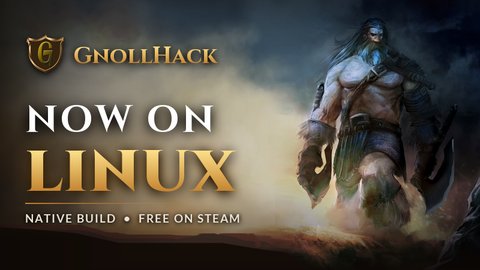
Example artwork by Matt Forsyth. Not free to use: a commercial license is required. See Example Image License.
Header Image (1920×622)
Steam suggests a header image. It is shown at the top of the event page, where it also sets the colors of the detail views. Different Steam pages show different parts of it, so the header must work when it is shown in full, when it is heavily cropped, and when its bottom part is covered.
Valve's header template marks these areas:
| Area of the 1920×622 Image | What Valve's Template Says |
|---|---|
| Rows 114–494, columns 85–1835 | Make sure the logo and critical text fit in this box |
| Rows 0–113 | The artwork should bleed out to all this space. It is visible only during the parallax scrolling effect |
| Rows 495–622 | The artwork should bleed out to all this space. It is sometimes blocked by the event title |
| Columns 0–84 and 1836–1919 | Outside the box, hatched in the template |
Screenshots of a published GnollHack event match the template. In the event pop-up opened from the game's news list, only rows of about 115–500 were visible, at full width. On the event page, the top 110 rows or so were cut off, and the event's text panel covered the rows below about 500 in the middle of the image.
Rules for the header:
- Keep the logo, every line of text, and the subject's face inside the safe band, rows 150–472. This leaves a margin inside Valve's box.
- Start the text no closer than 120 pixels from the left edge.
- Fill rows 0–150 and 472–622 with artwork that carries no information, such as sky or ground.
- Keep the text left of about column 1240 so that it never overlaps the subject.
- Put the logo, about 270 pixels high, at the left, centered on row 311. Put the text to its right in this order: the game name, the supporting heading (for example "NOW AVAILABLE ON"), the key word, the divider, and the tagline. Center the whole text block on row 311.
- Keep the tagline short, such as "FREE • OPEN SOURCE • NO ADS", so that it does not run into the subject.
- When the art, scaled to 1920 pixels wide, puts the subject's face above row 150, move the art down (70 pixels in the example) and fill the gap at the top with a vertically mirrored, blurred copy of the art's top rows.
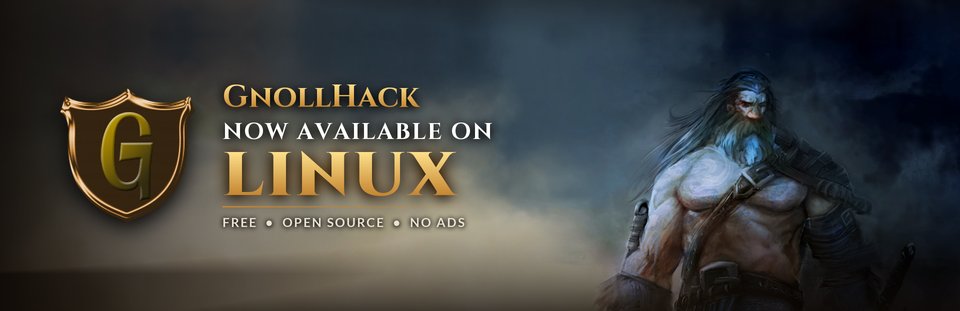
The same header, cropped to rows 114–494 as in the event pop-up:

Spotlight Image (2108×460)
Steam can also show an event spotlight on the game's library detail page. Create a spotlight image only when the user asks for one. Valve's template for it:
- Keep everything important inside columns 64–2043; the edges outside them are hatched in the template.
- Center the key artwork or the logo in the left part of the image, around columns 270–770.
- Steam can fill the right part of the image, about columns 935–1900 and rows 98–360, automatically with the event title and summary. Ask the user whether to use that. If yes, keep that area free of text; if not, the artwork and your own text can use the whole image.
Use the same fonts, colors, and grading as the cover and the header.
Example Image License
The example images on this page contain artwork by Matt Forsyth from a commercial art pack. They are not free: any use of them requires a commercial license. They are on this page only to show the layout to AI agents and must not be used in an event.
Reference Script
The script below created the example images. Change the parameters at the top: the source picture, the output directory, the texts, and the art shifts. It writes the cover, the header, the header cropped to Valve's guide box, and the header with Valve's box (green) and the safe band (yellow) drawn on it. If the script and the rules on this page disagree, the rules on this page win.
"""Creates the Steam event cover (800x450) and header (1920x622) images for GnollHack.

The text goes on the left, so the source picture needs free space on its left side.
Writes cover.png, header.png, header_popup_crop.png and header_guides.png to OUT_DIR.
"""
import glob
import math
import os

from PIL import Image, ImageChops, ImageDraw, ImageEnhance, ImageFilter, ImageFont

# Parameters to change for each event
SOURCE = r"C:\path\to\source picture.jpg"
OUT_DIR = r"C:\path\to\scratch\steam_event"
GNOLLHACK_REPO = r"C:\hmp\GnollHack"
GAME_NAME = "GnollHack"
COVER_LINES = ("NOW ON", "LINUX")              # supporting heading, key word
COVER_TAGLINE = "NATIVE BUILD  \u2022  FREE ON STEAM"
HEADER_LINES = ("NOW AVAILABLE ON", "LINUX")
HEADER_TAGLINE = "FREE  \u2022  OPEN SOURCE  \u2022  NO ADS"
COVER_ART_SHIFT = 0                            # px the art moves down; the gap gets mirrored art
HEADER_ART_SHIFT = 70                          # keeps the subject's face inside the safe band

# Valve's header template: the logo and critical text must fit inside this box
GUIDE_TOP, GUIDE_BOTTOM, GUIDE_LEFT, GUIDE_RIGHT = 114, 494, 85, 1835
SAFE_TOP, SAFE_BOTTOM = 150, 472               # band used for the logo, text and face
HEADER_TEXT_RIGHT = 1240                       # text ends left of the subject
COVER_TEXT_RIGHT = 440

GOLD = ((255, 226, 140), (196, 132, 48))       # vertical gradient, top to bottom
WHITE = (255, 255, 255)
OFF_WHITE = (236, 226, 210)
SHADE = (14, 9, 6)

LATO_BOLD = os.path.join(GNOLLHACK_REPO, r"win\win32\xpl\GnollHackM\Resources\Fonts\Lato-Bold.ttf")
LOGO = os.path.join(GNOLLHACK_REPO, r"win\win32\xpl\GnollHackM\Assets\gnollhack-logo-test-2.png")


def find_cinzel(style):
    """Returns the path of the installed static Cinzel font of the given style ("Bold" or "Black")."""
    dirs = [os.path.join(os.environ.get("LOCALAPPDATA", ""), r"Microsoft\Windows\Fonts"), r"C:\Windows\Fonts"]
    for d in dirs:
        for path in sorted(glob.glob(os.path.join(d, "Cinzel*.ttf"))):
            if ImageFont.truetype(path, 10).getname() == ("Cinzel", style):
                return path
    raise SystemExit("Cinzel " + style + " is not installed")


CINZEL_BOLD = find_cinzel("Bold")
CINZEL_BLACK = find_cinzel("Black")


def font(path, size):
    return ImageFont.truetype(path, size)


def ramp(size, horizontal, func):
    """Builds an L mask from func(t), where t runs from 0 to 1 across one axis and func returns 0..1."""
    n = size[0] if horizontal else size[1]
    line = Image.new("L", (n, 1) if horizontal else (1, n))
    for i in range(n):
        v = round(max(0.0, min(1.0, func(i / n))) * 255)
        line.putpixel((i, 0) if horizontal else (0, i), v)
    return line.resize(size)


def fit_art(size, shift):
    """Scales the source to cover the canvas, keeps its right side, and moves it down by shift px."""
    w, h = size
    src = Image.open(SOURCE).convert("RGB")
    scale = max(w / src.width, (h - shift) / src.height)
    art = src.resize((math.ceil(src.width * scale), math.ceil(src.height * scale)), Image.LANCZOS)
    art = art.crop((art.width - w, 0, art.width, art.height))
    canvas = Image.new("RGB", size)
    if shift:
        top = art.crop((0, 0, w, shift)).transpose(Image.FLIP_TOP_BOTTOM).filter(ImageFilter.GaussianBlur(4))
        canvas.paste(top, (0, 0))
    canvas.paste(art.crop((0, 0, w, h - shift)), (0, shift))
    return canvas


def grade(img, dark_until, dark_alpha):
    """Darkens the text side, the top and bottom edges, and the lower corner under the text."""
    img = ImageEnhance.Color(ImageEnhance.Contrast(img).enhance(1.08)).enhance(1.05)
    side = ramp(img.size, True, lambda t: dark_alpha / 255 * max(0.0, 1 - t / dark_until) ** 1.6)
    edges = ramp(img.size, False, lambda t: (190 * max(0.0, (t - 0.62) / 0.38) ** 1.5
                                             + 90 * max(0.0, (0.18 - t) / 0.18) ** 1.5) / 255)
    corner = ImageChops.multiply(
        ramp(img.size, False, lambda t: 250 / 255 * min(1.0, max(0.0, (t - 0.66) / 0.22)) ** 1.3),
        ramp(img.size, True, lambda t: max(0.0, 1 - t / 0.62) ** 0.8))
    shade = Image.new("RGBA", img.size, SHADE + (0,))
    shade.putalpha(ImageChops.lighter(ImageChops.lighter(side, edges), corner))
    out = img.convert("RGBA")
    out.alpha_composite(shade)
    return out


def text_mask(size, x, y, text, fnt, tracking):
    """Renders text into an L mask with its ink top at y."""
    mask = Image.new("L", size, 0)
    draw = ImageDraw.Draw(mask)
    y -= fnt.getbbox(text)[1]
    for part in (text if tracking else [text]):
        draw.text((x, y), part, font=fnt, fill=255)
        x += fnt.getlength(part) + tracking
    return mask


def draw_text(base, x, y, text, fnt, color, tracking=0, shadow=8, glow=None):
    """Draws text with its ink top at y and returns the ink box.

    color is an RGB tuple or a (top, bottom) gradient; glow is (rgb, radius, strength).
    """
    mask = text_mask(base.size, x, y, text, fnt, tracking)
    box = mask.getbbox()
    if shadow:
        blur = mask.filter(ImageFilter.GaussianBlur(shadow)).point(lambda v: min(255, v * 200 // 128))
        alpha = Image.new("L", base.size, 0)
        alpha.paste(blur, (0, max(1, shadow // 3)))
        layer = Image.new("RGBA", base.size, (0, 0, 0, 0))
        layer.putalpha(alpha)
        base.alpha_composite(layer)
    if glow:
        rgb, radius, strength = glow
        layer = Image.new("RGBA", base.size, rgb + (0,))
        layer.putalpha(mask.filter(ImageFilter.GaussianBlur(radius)).point(lambda v: v * strength // 255))
        base.alpha_composite(layer)
    if isinstance(color[0], tuple):
        top, bottom = color
        fill = Image.new("RGB", base.size, bottom)
        fill.paste(top, (0, 0, base.width, box[1]))
        gh = box[3] - box[1]
        grad = Image.linear_gradient("L").resize((base.width, gh))
        fill.paste(Image.composite(Image.new("RGB", (base.width, gh), bottom),
                                   Image.new("RGB", (base.width, gh), top), grad), (0, box[1]))
    else:
        fill = Image.new("RGB", base.size, color)
    layer = fill.convert("RGBA")
    layer.putalpha(mask)
    base.alpha_composite(layer)
    return box


def divider(base, x, y, length, thickness):
    """Draws a gold line that fades out to the right."""
    line = Image.new("RGBA", (length, thickness), GOLD[1] + (255,))
    line.putalpha(ramp((length, thickness), True, lambda t: (1 - t) ** 1.2))
    base.alpha_composite(line, (x, y))


def place_logo(base, x, y, height):
    """Draws the GnollHack shield with a soft shadow and returns its width."""
    logo = Image.open(LOGO).convert("RGBA")
    logo = logo.crop(logo.getbbox())
    logo = logo.resize((round(logo.width * height / logo.height), height), Image.LANCZOS)
    pad = height // 4
    shadow = Image.new("RGBA", (logo.width + 2 * pad, height + 2 * pad), (0, 0, 0, 0))
    shadow.paste((0, 0, 0, 255), (pad, pad, pad + logo.width, pad + height), logo.getchannel("A"))
    shadow = shadow.filter(ImageFilter.GaussianBlur(height // 12))
    base.alpha_composite(shadow, (x - pad, y - pad + height // 20))
    base.alpha_composite(logo, (x, y))
    return logo.width


def stack(base, x, rows, right, top=None, center=None):
    """Draws text rows downward from an ink top, or centered on a row.

    Each row is (text, font, color, tracking, gap_above, options); options may hold
    "shadow", "glow" and "divider" = (length, thickness, px_above_ink_top).
    """
    heights = []
    for text, fnt, _, tracking, _, _ in rows:
        bb = fnt.getbbox(text)
        heights.append(bb[3] - bb[1])
    total = sum(heights) + sum(r[4] for r in rows)
    y = top if top is not None else center - total // 2
    for (text, fnt, color, tracking, gap, opts), h in zip(rows, heights):
        y += gap
        if "divider" in opts:
            length, thickness, above = opts["divider"]
            divider(base, x, y - above, length, thickness)
        box = draw_text(base, x, y, text, fnt, color, tracking, opts.get("shadow", 8), opts.get("glow"))
        if box[2] > right:
            print("WARNING: '%s' ends at x=%d, past the limit %d" % (text, box[2], right))
        y += h
    return y


def make_cover():
    base = grade(fit_art((800, 450), COVER_ART_SHIFT), 0.62, 215)
    x = 44
    lw = place_logo(base, x, 58, 64)
    draw_text(base, x + lw + 14, 77, GAME_NAME, font(CINZEL_BOLD, 38), GOLD, shadow=6)
    rows = [
        (COVER_LINES[0], font(CINZEL_BOLD, 62), WHITE, 4, 0, {"shadow": 10}),
        (COVER_LINES[1], font(CINZEL_BLACK, 96), GOLD, 2, 29, {"shadow": 10, "glow": ((255, 170, 60), 14, 110)}),
        (COVER_TAGLINE, font(LATO_BOLD, 19), OFF_WHITE, 2, 38, {"shadow": 4, "divider": (300, 2, 19)}),
    ]
    stack(base, x - 2, rows, COVER_TEXT_RIGHT, top=174)
    return base.convert("RGB")


def make_header():
    base = grade(fit_art((1920, 622), HEADER_ART_SHIFT), 0.66, 235)
    x = 120
    middle = (SAFE_TOP + SAFE_BOTTOM) // 2
    lh = 270
    lw = place_logo(base, x, middle - lh // 2, lh)
    rows = [
        (GAME_NAME, font(CINZEL_BOLD, 62), GOLD, 0, 0, {"shadow": 10}),
        (HEADER_LINES[0], font(CINZEL_BOLD, 46), WHITE, 3, 30, {"shadow": 10}),
        (HEADER_LINES[1], font(CINZEL_BLACK, 124), GOLD, 6, 22, {"shadow": 14, "glow": ((255, 170, 60), 20, 110)}),
        (HEADER_TAGLINE, font(LATO_BOLD, 25), OFF_WHITE, 3, 44, {"shadow": 5, "divider": (520, 3, 24)}),
    ]
    stack(base, x + lw + 54, rows, HEADER_TEXT_RIGHT, center=middle)
    return base.convert("RGB")


def guides(header):
    """Returns a copy of the header with Valve's guide box and the safe band drawn on it."""
    img = header.copy()
    draw = ImageDraw.Draw(img)
    draw.rectangle((GUIDE_LEFT, GUIDE_TOP, GUIDE_RIGHT, GUIDE_BOTTOM), outline=(0, 255, 0), width=3)
    draw.rectangle((GUIDE_LEFT, SAFE_TOP, GUIDE_RIGHT, SAFE_BOTTOM), outline=(255, 255, 0), width=2)
    return img


os.makedirs(OUT_DIR, exist_ok=True)
make_cover().save(os.path.join(OUT_DIR, "cover.png"))
header = make_header()
header.save(os.path.join(OUT_DIR, "header.png"))
header.crop((0, GUIDE_TOP, header.width, GUIDE_BOTTOM)).save(os.path.join(OUT_DIR, "header_popup_crop.png"))
guides(header).save(os.path.join(OUT_DIR, "header_guides.png"))
print("Images written to", OUT_DIR)
Checking and Delivering
Before delivering:
- Look at every image the script wrote, including the cropped header and the header with the guide boxes.
- Check that the logo, all text, and the subject's face are inside the safe band of the header, and that no text line touches the divider, another line, or the subject.
- Check that the script printed no warnings about text running past its limit. If it did, shorten the text or reduce the font size.
- Fix any unfinished part of the art that is still visible, for example by darkening it more.
Then deliver to the user:
- the event type, title, subtitle, and summary, each in its own copiable text block;
- the body in BBCode, in one copiable text block;
- the cover image and the header image as PNG files, with their full paths in your scratch directory, and sent to the user directly if your tools can send files. The user uploads them in the event editor;
- a short list of any facts that you could not verify, for the user to check before posting.
Never post or publish anything on Steam yourself.
External Links
Read on October 23, 2026: