👉 How a Finnish nonprofit wrapped a 500,000-line C game engine in .NET MAUI and Avalonia UI, built a free in-game AI advisor with 31 tools, and created a multi-judge benchmark to keep its advice honest.
By Sound Mind Games (Hyvän mielen pelit ry)
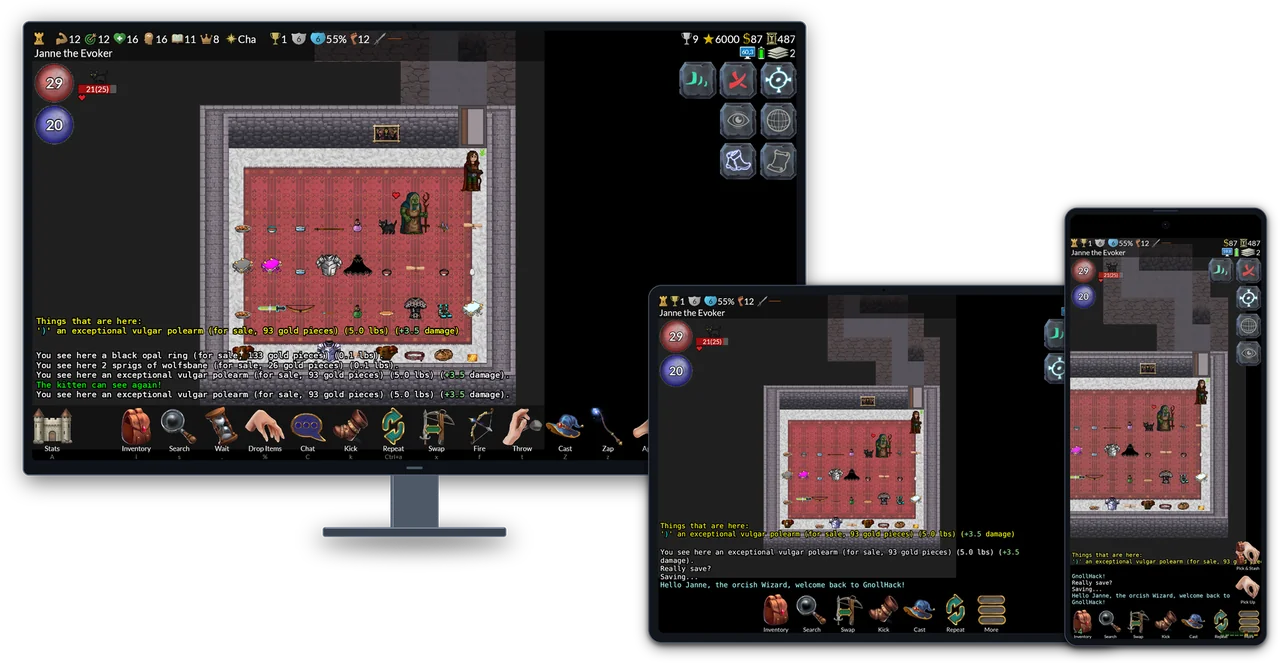 GnollHack on a desktop, a tablet, and a phone. One C engine and one C# codebase serve Android, iOS, Linux, macOS, Windows, and the Steam Deck.
In NetHack, one wrong move can end a character that took days to build. Eat the wrong corpse, touch the wrong monster bare-handed, or pray too soon, and the run is over. There is no reload. So when we put an AI advisor inside our NetHack-based game, we had to answer an uncomfortable question: How do you know the advice is right?
That question shaped the advisor and the benchmark behind it. The stack they run on is unusual as well. Most developers know .NET MAUI and Avalonia UI from enterprise forms and business software, and game developers starting a cross-platform 2D project usually reach for Unity, Godot, or Unreal.
Our team at Sound Mind Games (Hyvän mielen pelit ry, a Finnish nonprofit working on gaming and mental health) took a different route. We built GnollHack, a free, open-source graphical remaster and expansion of the 1987 roguelike NetHack, on Xamarin.Forms and SkiaSharp, and migrated it to .NET MAUI, the successor to Xamarin.Forms, by April 2025. In 2026, we integrated Avalonia UI into the game as the cross-platform desktop renderer for .NET MAUI controls on Linux and macOS. The game ships on Steam (Windows, Linux, macOS, and Steam Deck), Google Play, and the App Store.
NetHack is famous for decades of hidden rules, and looking things up in ten wiki tabs mid-fight breaks the flow of the game, especially on a phone or a handheld. So we built the Gnoll Overseer, an opt-in AI advisor inside the game that gives players free access to frontier models from Anthropic, Google, and OpenAI. Because a single confident wrong answer can kill a character, we also built GnollBench, a benchmark that tests models under the live product's own prompt and tools.
Below is how the architecture fits together, how the benchmark scores answers, and how we use coding agents for most of our code while the game's C engine, art, music, and voiceovers stay human-made.
🐺 Why Build a Game in .NET MAUI and Avalonia UI?
NetHack's C/C++ codebase has about 500,000 lines of code and models thousands of interactions between items, monsters, and dungeon features. Rewriting those rules in C# would have been a massive amount of work and meant years of introducing subtle bugs into mechanics that players have relied on for decades.
Instead, we kept the C/C++ core, extended it for GnollHack, and compiled it as a native library on every platform. A shared C# layer talks to the engine through P/Invoke.
Why Xamarin.Forms and SkiaSharp
GnollHack was forked from NetHack 3.6.2 in July 2019 and was at first a purely text-based ASCII game. In 2020 and 2021, we wrote the first version of the game's graphical port, which was based on NetHack's graphical Windows version that used simple 2D tiles (NetHackW.exe). We extended it and wrote a new graphics engine with GDI+. That version of GnollHack was released on January 22, 2021. Shortly after that, we began developing the mobile version. We spent about five months searching for the right technologies, and in May 2021, we started programming a new client with Xamarin.Forms and SkiaSharp. We chose them over a game engine for these reasons:
- Development in Visual Studio. We wanted to build the C engine and the client in Visual Studio, and to debug C and C# code in the same session. That ruled out engines that are used through their own editor, such as Unity and Godot.
- One codebase for Android and iOS. Xamarin.Forms shared about 95% of the code between the two. Once the Android version was ready, the iOS version took about two weeks.
- Cross-platform UI library. We didn't want to program UI controls manually, and Xamarin.Forms provided a UI control library for both platforms, something that was missing from most of the technologies we tried out. It also gave access to device features such as file sharing and preferences.
- Backing by Microsoft. Xamarin.Forms was well established, and Microsoft was already building its successor, .NET MAUI.
- Interoperability with C. .NET can call a native C library and marshal its data to C# and back.
- SkiaSharp resembles GDI+. That made the graphics engine of the Windows client easy to port. SkiaSharp also drew the main screen at about 30 FPS on the CPU and 60 FPS on the GPU, even on low-end devices.
- FMOD could be made to work. FMOD, our sound middleware, has a Unity integration for Mono and C#, which Xamarin also used, and we could build on it to get FMOD working on Android and iOS.
C# was also a language we had used for 15 years.
From Xamarin.Forms to .NET MAUI
The Android version entered beta in April 2022 and the iOS version in June 2022, and both were officially released on March 18, 2023. Work on the .NET MAUI client began in August 2023. Its first release was the Windows version, which entered beta on July 30, 2024, on .NET MAUI 8. The Android and iOS versions moved from Xamarin.Forms to .NET MAUI between February and April 2025, and performance enhancements in .NET 9 allowed us to release a non-beta Windows version on Steam on April 30, 2025.
Today, SkiaSharp draws the 2D dungeon with GPU acceleration at 60 FPS or more (up to 90 FPS in the Avalonia builds), and FMOD plays sound effects, music, and voiceovers. The C engine runs on its own thread, so turn calculations never block the UI or the animations.
Avalonia UI on Linux and macOS
In GnollHack, .NET MAUI itself runs the Android, iOS, and Windows clients, the last through WinUI 3. .NET MAUI has no official Linux backend, and WinUI 3 apps do not run under Valve's Proton compatibility layer on the Steam Deck. Instead of maintaining a second UI codebase, we compile the same GnollHackM.csproj and XAML pages with Avalonia.Controls.Maui in our Avalonia Port. It gives us native builds for Linux, the Steam Deck, and Apple Silicon Macs, rendering through OpenGL on Linux and Metal on macOS. The Linux version was released on Steam on October 22, 2026, and the macOS version on November 5, 2026. The same build also runs on Windows, through Direct3D 11 and ANGLE, for development and testing.
GnollHack in numbers:
- Engine: About 500,000 lines of C99, forked from NetHack 3.6.2 in July 2019.
- Client: About 180,000 lines of C# and XAML in one shared codebase.
-
UI backends: .NET MAUI for Android, iOS, and Windows;
Avalonia.Controls.Mauifor Linux, macOS, and the Steam Deck. - Content: Over 23,000 base tiles of 64×96 pixels, over 1,100 sound effects, 37 music tracks, and over 5,000 voiceover lines recorded by 96 voice actors in 111 roles. All of it was made by artists, composers, and voice actors, not by generative AI.
- Project: Over 11,000 commits, about 4,000 monthly players (most of them on mobile), and a 4.6★ rating on Google Play. The game is free, with no ads or microtransactions.
🧙 Gnoll Overseer: Free Frontier AI Inside a Game Client
A typical GnollHack playthrough lasts about 50,000 turns over several days. Along the way, a player runs into situations where three or four obscure mechanics interact at once: monster resistances, character intrinsics, cursed gear, and prayer timeouts. Reading a separate wiki article for each one is slow.
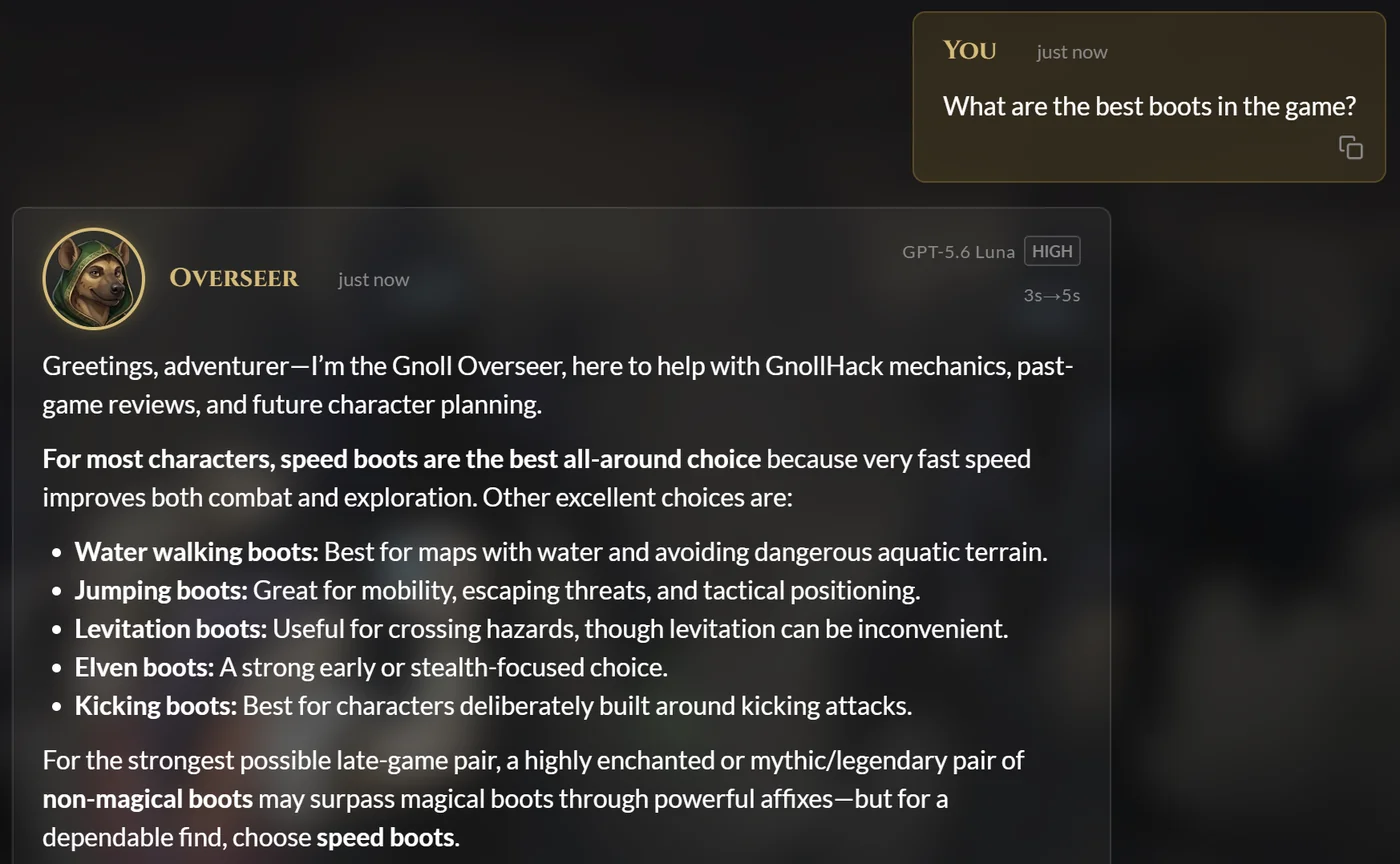 The Gnoll Overseer answering a question about boots. The header of the answer shows the model and its thinking level.
The Gnoll Overseer is an optional advisor built into the game client, and it is also available on the web at overseer.gnollhack.com. What sets it apart from most in-game assistants is both its cost model and its architecture:
- Free frontier models, or bring your own key: Players get free system models from OpenAI, Google, and Anthropic. They can also add their own API key.
- Live game snapshots from the C engine: When a player opens the Overseer during a game, the C engine writes a plain-text snapshot of the game state that covers attributes, equipment, inventory and container contents, the visible map with a coordinate legend, recent messages, discoveries, and conducts.
- 31 tools, 20 on the server and 11 on the device: The Overseer looks up facts instead of relying on what the model remembers from training. The server tools query monster, item, and artifact definitions, search nearly 5,000 pages of the GnollHack and NetHack wikis, and read the C source code of both games. The device tools return data from the player's own device, such as a fresh game snapshot, the full message history, the dumplogs (end-of-game reports) of past characters, and the game's panic and app logs. A tool policy sets the order of sources: the game snapshot first, then the knowledge base, the wiki and game data, the source code, GitHub, and the web. For multi-step research, the main model can hand work to three specialist sub-agents that run in parallel (the Wiki Researcher, the Source Investigator, and the Game Data Analyst). Players turn them on in the settings.
- Spoiler protection and privacy modes: By default, the Overseer checks what the player has already discovered, so it does not spoil unseen bosses or puzzle solutions. Each chat can be Standard, Confidential (encrypted at rest, internet tools off, and permanently destroyed on deletion), or Incognito (kept in server memory only and never written to disk).
Technology Stack
The Overseer is a web application that the game embeds:
| Layer | Technology | Role |
|---|---|---|
| Frontend | Angular and TypeScript | A single-page chat application. The same app runs in a web browser and inside the game. |
| Backend | ASP.NET Core with SignalR, and SQL Server through Entity Framework Core | Calls the AI providers, runs the server tools, and streams each answer to the chat as it is written. |
| Knowledge sources | Lucene.NET, and an in-memory source code index built with a custom C lexer | Full-text search of both wikis, and lookups in the C source code of GnollHack and NetHack. |
| GnollHack integration | The platform's WebView, with a two-way JavaScript bridge to the C# client | Shows the chat inside the game and lets the server call the device tools. |
In the game, the chat runs in WebView2 on Windows, WKWebView on iOS and macOS, Android WebView on Android, and the Chromium Embedded Framework on Linux. When the model needs something from the player's device, the server sends a request to the chat over SignalR, the chat passes it to the C# client through the bridge, and the result travels back the same way.
For more detail on the server design and the client bridge, see the Technological Overview of Gnoll Overseer.
👑 GnollBench: Benchmarking AI When Wrong Advice Kills Characters
Public AI leaderboards such as Artificial Analysis and Arena answer a general question: How capable is this model at math, coding, and general chat? They cannot tell you whether a model will confidently tell a player to fight a cockatrice bare-handed (which turns the character to stone), or whether it can read a bitmask in GnollHack's C source correctly.
To measure how models actually perform as the Overseer, we built GnollBench. Three design rules set it apart from general benchmarks.
1. The Production Configuration Is the Instrument
A candidate model is not tested with a simplified benchmark prompt. It gets the exact production system prompt and the 16 read-only lookup tools the live chat uses: wiki search; monster, item, and artifact data; the knowledge base; and C source code inspection. When a model fails a question, the failure is one that players would hit too, and it often points to a missing fact on the wiki or a tool description that needs to be clearer.
2. A Blind Grading Panel from Two Providers, Plus a Source-Code Verifier
When one AI model grades another, it tends to favor answers written by models from its own provider. GnollBench spreads grading over several roles:
- Candidate (the model under test): Answers the questions of one or more suites with the production tools. A standard suite has 18 questions, six each at the Simple, Intermediate, and Advanced levels. A suite can also be built from a real exported game snapshot, with questions about that exact game.
- Assessor and Co-Assessor (the panel): Two judge models from two different providers, with at least one model from a provider different from that of the model under test. Both grade every answer at the same time, blind to each other, against a detailed rubric (expected answer criteria). Their average sets the quality score.
- Reference Reader: An optional third judge from a third provider. It grades every answer blind as an anchor for measuring how well the judges agree, and it flags disputed verdicts for human review. It never changes a score.
- Claim Verifier: An optional agent with read-only tools that checks unverified and disputed claims against the C source, the wiki, or the game snapshot. Every verdict must cite its evidence, such as the deciding lines of a source file.
3. Non-Compensatory Scoring, a Cap on Critical Errors, and a Reward for Honesty
Each answer is graded from 0 to 6 on a behaviorally anchored rating scale in four dimensions: Accuracy (55%), Completeness (25%), Conciseness (10%), and Readability (10%). Under an arithmetic mean, a polite, well-structured answer could pass despite being wrong. GnollBench combines the dimensions with a weighted geometric mean instead:
$Q = A^{0.55} \cdot C^{0.25} \cdot Cn^{0.10} \cdot R^{0.10}$
If Accuracy drops to level 1 (15 points) while every other dimension is at a perfect level 6 (100 points), the geometric mean pulls the score down to 35. An arithmetic mean would give 53.
Two more rules shape how a model is rewarded for handling uncertainty:
- The critical-error ceiling (25 of 100): If an answer confidently states a falsehood that would hurt a player who acted on it, the score is capped at 25. The falsehood must be contradicted by the rubric or the game board, and the grader must quote the sentence word for word. If the two panel judges disagree on whether a critical error occurred, the Claim Verifier checks the quoted sentence against the source code and the wiki to uphold or overturn the cap.
- The honesty floor (50 of 100): Most benchmarks punish a model for saying "I don't know," which rewards guessing. In GnollBench, an answer that says it could not find or verify the information, and gives no value or recommendation in its place, is marked Not Attempted. If it makes no critical error and its Accuracy is level 5 or higher, it scores at least 50, twice the most a dangerous bluff can get. With a correct answer worth about 92 points, answering a question where a wrong answer would be dangerous pays off only when the model is at least about 37% sure.
What GnollBench Showed Across Frontier Models
GnollBench reports three headline metrics: the Intelligence Index (difficulty-weighted quality, with a 95% confidence interval), Speed (the model's own time per answer, with tool execution time subtracted), and Cost. It publishes no index for a run in which a provider error stopped a question.
For our October 2026 engineering review, we ran nine model configurations through a 36-question battery (two 18-question suites). Claude Opus 5 and GPT-5.6 Sol formed the panel, and Gemini 3.8 Flash served as the Reference Reader and the Claim Verifier. The cost column is the candidate's cost for one pass through the battery at catalog prices on October 11, 2026.
| Candidate Model (Thinking Level) | Provider | Intelligence Index (0–100) | Mean Time per Question | Battery Cost (36 Questions) |
|---|---|---|---|---|
| GPT-6 Astra (medium) | OpenAI | 87 | 21.2 s | $6.97 |
| GPT-6 Luna (max) | OpenAI | 83 | 74.3 s | $0.24 |
| GPT-6 Luna (high) | OpenAI | 83 | 28.2 s | $0.11 |
| GPT-5.6 Luna (max) | OpenAI | 82 | 48.3 s | $0.37 |
| Claude Haiku 5.5 (xhigh) | Anthropic | 81 | 45.4 s | $0.30 |
| GPT-5.6 Luna (high) | OpenAI | 81 | 25.8 s | $0.21 |
| Claude Sonnet 5.5 (high) | Anthropic | 79 | 16.5 s | $2.15 |
| Claude Opus 5.5 (medium) | Anthropic | 79 | 27.2 s | $4.03 |
| Claude Sonnet 5.5 (medium) | Anthropic | 76 | 10.5 s | $1.40 |
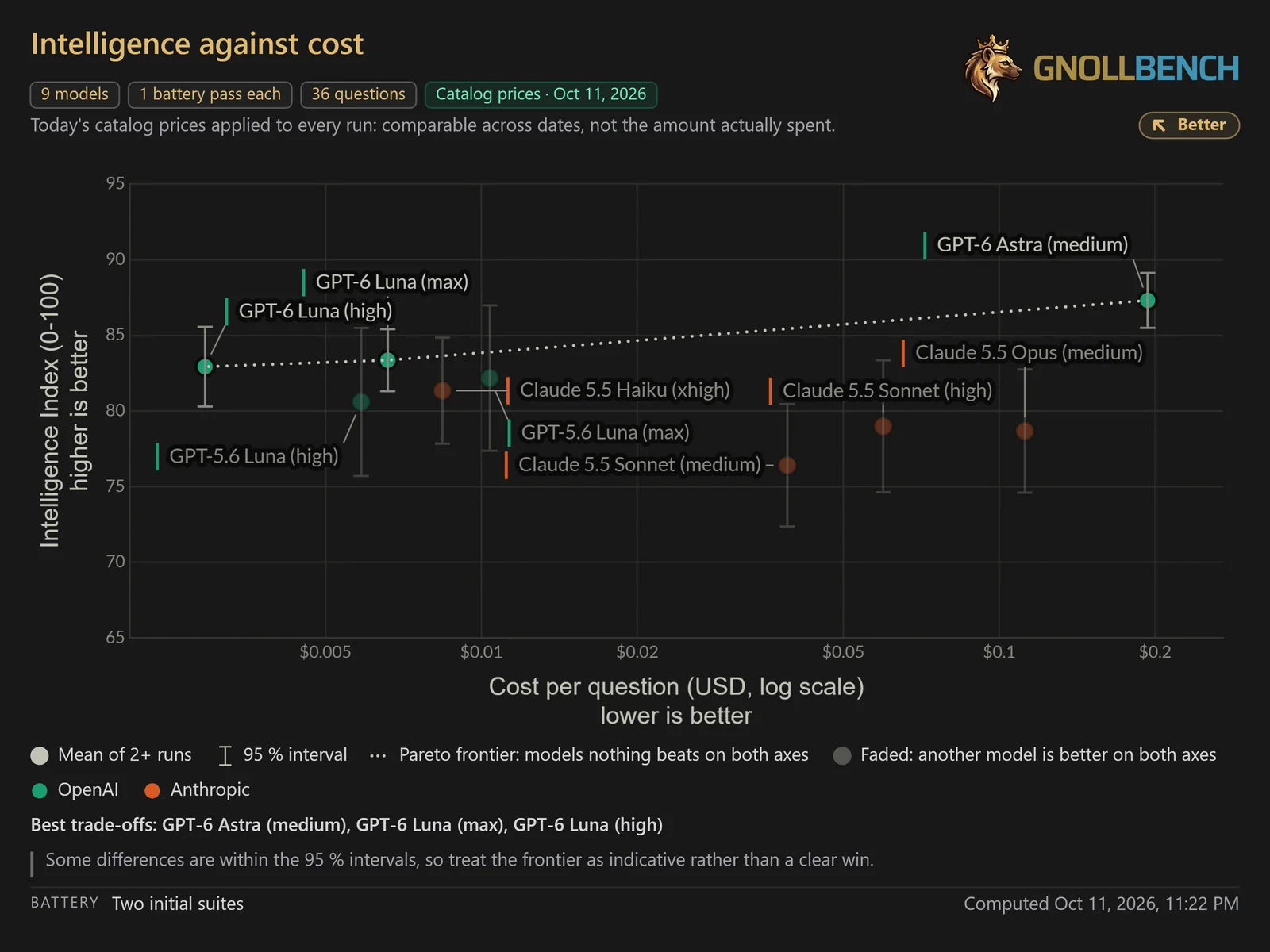 Intelligence against cost per question, on a log scale. The dotted line is the Pareto frontier: GPT-6 Astra (medium), GPT-6 Luna (max), and GPT-6 Luna (high).
Plotting intelligence against cost showed the trade-offs at once. GPT-6 Luna (high) reached an Intelligence Index of 83 for $0.11 per battery, at about 28 seconds per question. The top scorer, GPT-6 Astra (medium), reached 87 for $6.97, more than 60 times the cost. Some of these differences fall within the 95% confidence intervals, so the frontier is a guide rather than a final ranking. GPT-6 Luna (high) is also the model we suggest players start with in Choosing AI Model for Gnoll Overseer.
Reliability counts too. GPT-6.1 Sol (medium) scored 86.4 at 19.3 seconds per question in a separate run, but two of its battery runs failed on provider errors. Because GnollBench publishes no index for an interrupted run, those failures showed up in the results instead of hiding inside an average.
For the full statistical model, the comparability rules, and a comparison with public benchmarks such as Artificial Analysis, HealthBench, and BALROG, see the Technological Overview of GnollBench and the Comparison of GnollBench and Popular AI Benchmarks.
🛠️ How We Use Coding Agents, and Where We Don't
Coding agents have improved quickly, and with the release of Claude Opus 5.5, we moved to an agentic workflow: AI agents write most of our code, and human developers supervise them. How far that goes depends on the codebase:
- GnollHack's C engine is the one place where a human developer still has to write the code, because the C code is complex and fragile. Even there, AI agents review the code and check it for edge-case errors, and they help with research, difficult tasks, and crash reports from Sentry.
- Most of our other codebases are written in modern languages such as C# and TypeScript, and there coding agents write most of the code. The Gnoll Overseer and GnollBench are written entirely by agents. Detailed agent skills let the agents write large amounts of code quickly with few errors. The agents also write unit tests and check that their changes have not caused regressions. A human is the system architect, reviews every implementation plan, and tests the result.
All art, music, and voiceovers in the game are made by people. On the other hand, many pieces of art used by the Gnoll Overseer and GnollBench are made with generative AI tools. Our AI usage guidelines are detailed in our AI Usage Policy.
Our main coding harness is Claude Code, but the AI skills in our GitHub repositories also support Google Antigravity and OpenAI Codex.
1. Evidence-Based Crash Analysis Across C and C# with Sentry MCP
GnollHack runs a C99 engine inside a .NET MAUI or Avalonia host, so a production crash can start in C, in C#, or inside one of the frameworks underneath. Both layers report to Sentry, the error-reporting service we use with GnollHack. The C# app uses Sentry's .NET SDK. When the C engine reports an error, the report carries the engine's last 40 debug messages and the current game state, and both layers add breadcrumbs. Hard native crashes are caught by sentry-native, and EnableScopeSync hands it the latest .NET context, so even those reports show what the player was doing.
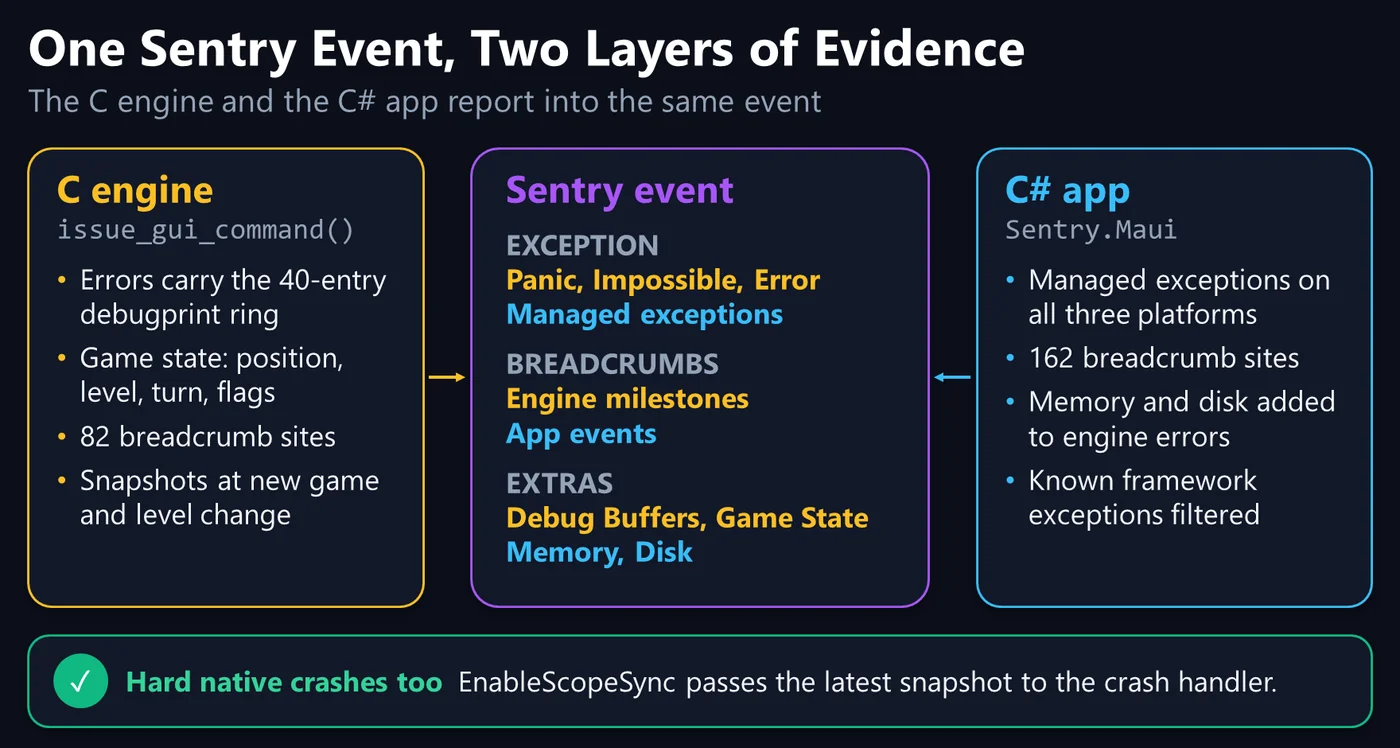 How the C engine and the C# app contribute evidence to the same Sentry event. From our October 2026 engineering review.
When an issue appears in Sentry, our coding agent connects through the Sentry MCP (Model Context Protocol) server and follows a crash-analysis skill:
- It reads every event of the issue, with breadcrumbs, extras, and native and managed stack traces.
- It reads our code next to nine framework repositories checked out on local disk: .NET MAUI, the .NET runtime, .NET for Android, .NET for iOS, WinUI, CsWinRT, SkiaSharp, Skia, and HarfBuzz. Lately, the Avalonia UI repositories have joined them as well. When a stack trace ends in framework code, the agent keeps reading.
- It must end its report with a plain Yes or No: Was a definitive root cause found? Speculation does not count. If the answer is No, the agent proposes targeted debug logging, wizard-mode test scenarios, and what to watch for in the next reports. If it is Yes, it either fixes the bug or drafts an upstream issue, with a minimal reproduction code snippet or an entire reproduction repository on GitHub.
2. On-Demand Agent Skills and a Shared Plans Repository
To keep coding agents effective without filling their context windows, the rules loaded into every session stay small (under 10,000 tokens), and everything else goes into more than 60 modular skills, over 250,000 words on client architecture, server patterns, build pipelines, and benchmark analysis. A skill loads only when a task needs it. For example, our build-pipeline skill documents every step and trap of building the native C solution, the game data, and the .NET MAUI targets. With it, an agent, or a framework engineer checking one of our bug reports, can build the whole project from a clean clone.
One skill governs how every non-trivial change is made: our implementation planning skill, agent-implementation-planning. It requires a written plan, approved by a human, before an agent changes more than one file, a public interface or database schema, or anything that crosses a build step. Single-file fixes need no plan. The work goes through five phases:
- Research: The agent reads the affected code and its dependencies without modifying any file. It works from the source code, not from earlier plans, which may describe rejected or outdated designs.
- Plan: The agent writes the plan as a Markdown document in a fixed format: the affected files, the proposed changes in dependency order, the work assigned to sub-agents, the risks, and the verification plan. The plan must be complete enough for an implementer that has none of the planning session's context. It is saved in a shared Git repository of plans, so it follows the work across computers, sessions, and agent tools, and a revision becomes a new version instead of overwriting the old one.
- Approve: The agent stops, and a human architect reviews the plan. No project file is edited before the plan is approved.
- Execute: The agent implements the plan step by step and tracks its progress in a checklist. Coding sub-agents edit files, each one only its own, but they never build or test.
- Verify: The main agent runs the builds, the tests, and the linters itself, and writes a walkthrough of what changed and what was tested, with a commit description for the work.
Agents commit and push to a project repository only when a human asks them to.
💡 Summary
GnollHack keeps NetHack's C engine as a native library and runs a shared C# client on top of it. We started the client on Xamarin.Forms and SkiaSharp in 2021, migrated it to .NET MAUI by April 2025, and brought it to Linux, the Steam Deck, and macOS in 2026 through Avalonia UI, all from one codebase.
The Gnoll Overseer adds an optional AI advisor to that client. It is a web application that the game embeds, it reads a live snapshot of the game from the C engine, and it looks facts up with its 31 tools instead of relying on the model's memory.
GnollBench measures how well a model does that job. It tests each model with the production prompt and tools, grades the answers with a blind panel of judges from two providers, and scores them so that a dangerous error caps the score and an honest admission of not knowing keeps a floor.
Coding agents now write most of our code under human supervision, and the C engine is the exception. Two workflows support this: crash analysis that must end with a Yes or No on the root cause, and an implementation planning skill that requires a human-approved plan before any non-trivial change.
📖 Learn More
- Technological Features and Avalonia Port
- Technological Overview of Gnoll Overseer
- Technological Overview of GnollBench and Comparison of GnollBench and Popular AI Benchmarks
- Design Details of Native Crash Reporting
🔗 External Links
- Play GnollHack: Steam (Windows, Linux, macOS, and Steam Deck), Google Play, the App Store, and GitHub Releases
- Try the Gnoll Overseer: In the game, or on the web at overseer.gnollhack.com
- Game client and C engine: github.com/hyvanmielenpelit/GnollHack
- Gnoll Overseer and GnollBench server: github.com/hyvanmielenpelit/MobileGnollHackLogger
📅 Validity
As of version 3.39 and November 9, 2026.